

Download Videos Without the Annoying Ads
Tired of popups and sketchy download buttons? We get it. That's why VidioDownload keeps things simple
– just paste a link, pick your quality, and download. No ads, no tricks, no signup required.
We support YouTube, Facebook, Instagram, Twitter, and tons of other sites. Whether you want MP4,
WebM, or just the audio as MP3, we've got you covered.
How It Works
Downloading a video takes about 10 seconds. Here's how:
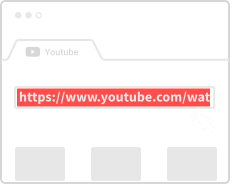
Copy the Link
Find a video on YouTube, Instagram, or wherever – then copy the URL from your browser's address bar.
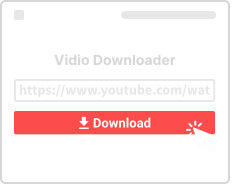
Paste It Here
Drop the link in the box above and hit the download button.
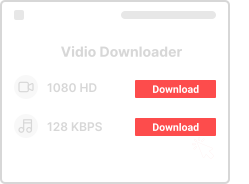
Save Your Video
Pick a format (MP4, MP3, etc.) and resolution, then save it straight to your device.
Why People Love VidioDownload
Works on your phone, tablet, laptop – basically anything with a browser. Here's what makes us different:

No Download Limits
Download 5 videos or 500 – we don't put any caps on how many you can save. It's all free.

Works Everywhere
iPhone, Android, Windows, Mac – doesn't matter. If you have a browser, you can use VidioDownload.

Multiple Formats
Need video? Get MP4. Just want audio? Grab the MP3. We support whatever format works for you.

Safe and Private
We don't store your videos or track what you download. The site uses HTTPS, so your connection is secure.

No Account Needed
Just show up and download. No email signup, no password, no profile – none of that.

Shorts and Reels Too
YouTube Shorts, Instagram Reels, TikTok videos – we handle the short-form stuff just as well.
Popular Video Downloaders
Need a dedicated tool for a specific platform? Check out our specialized downloaders:
Supported Platforms and Websites
VidioDownload works with over 1000 different websites and platforms. Whether you're trying to save a tutorial from YouTube, a memorable moment from Facebook, or a trending video from TikTok, our tool has you covered. Here's a detailed look at the major platforms we support:
YouTube Video Downloads
As the world's largest video platform, YouTube hosts billions of videos ranging from entertainment and education to music and vlogs. VidioDownload supports all types of YouTube content including regular videos, YouTube Shorts, music videos, playlists, and live streams. You can choose from multiple quality options including 360p, 480p, 720p HD, and 1080p Full HD. We also support audio extraction if you only need the MP3.
For YouTube, we offer specialized tools: our YouTube to MP4 Converter for video downloads, YouTube to MP3 Converter for audio extraction, and YouTube Thumbnail Downloader for saving video cover images.
Instagram Content Downloads
Instagram has evolved from a photo-sharing app to a full-fledged video platform. Our Instagram downloader works with regular video posts, Instagram Reels (short-form vertical videos), Stories, and IGTV long-form content. Whether it's a cooking tutorial, fitness routine, or just a funny clip your friend shared, you can save it directly to your device. Check out our dedicated Instagram Reels Downloader for short-form content.
Facebook Video Downloads
Facebook remains one of the most popular platforms for video sharing. Users share everything from personal memories to viral videos. Our Facebook Video Downloader supports public video posts, videos shared in groups, Facebook Watch content, and even Facebook Live recordings. We support both SD and HD quality options depending on what's available for each video.
Twitter/X Video Downloads
Twitter (now X) is home to breaking news clips, sports highlights, memes, and countless viral moments. Our Twitter Video Downloader lets you save video tweets quickly and easily. It works with regular video tweets, GIFs, and video replies. The platform is especially useful for saving news clips and highlights that might disappear from timelines.
TikTok Video Downloads
TikTok has taken the world by storm with its short-form video format. Our TikTok downloader helps you save those catchy videos without the watermark. Whether it's a dance trend, comedy skit, or educational content, you can download it in high quality to watch offline or share with friends.
Other Supported Sites
Beyond the major platforms, VidioDownload works with hundreds of other video hosting sites including Vimeo, Dailymotion, Twitch clips, Reddit videos, Pinterest video pins, LinkedIn video posts, and many more. You can view our complete list of supported sites which includes over 1000 different platforms.
Common Use Cases for Video Downloads
People use VidioDownload for many different reasons. Here are some of the most common scenarios where downloading videos comes in handy:
Offline Viewing
Not everyone has constant internet access. Maybe you're going on a long flight, commuting through areas with poor signal, or simply want to save on mobile data. Downloading videos ahead of time ensures you can watch your favorite content anytime, anywhere, without buffering or connection issues.
Educational Content
Students and professionals often need to reference tutorials, lectures, and how-to videos. Downloading these videos means you can study at your own pace, pause to take notes, and review complex topics multiple times without streaming repeatedly.
Content Creation
Content creators sometimes need reference material, B-roll footage (with proper permissions), or want to analyze trending content styles. Having videos downloaded locally makes editing and review much easier than constantly streaming.
Personal Archives
Social media content can disappear. Accounts get deleted, videos get removed, and platforms change. If there's a video that means something to you – maybe a family memory, an inspiring speech, or just something that makes you laugh – downloading it ensures you'll always have access.
Slow Internet Connections
If your internet is slow or unstable, streaming high-quality video can be frustrating. Downloading overnight or during off-peak hours lets you enjoy buffer-free playback whenever you want.
Tips for Better Video Downloads
Get the most out of VidioDownload with these helpful tips:
Choose the Right Quality
Higher quality means larger file sizes. If you're saving videos to watch on a phone screen, 720p is usually plenty. For TV or computer viewing, opt for 1080p. Only choose the highest available quality if you really need it, as file sizes can get quite large.
Use a Stable Connection
While downloading, a stable internet connection ensures you get the complete file without corruption. If you're on WiFi, try to stay connected until the download completes.
Check Available Formats
We offer MP4, WebM, 3GP, and MP3. MP4 is the most universally compatible format and plays on virtually every device. If you only need the audio from a music video, choose MP3 to save space.
Respect Copyright
Only download videos you have the right to download. This typically means videos you created yourself, videos in the public domain, or content that's explicitly licensed for sharing. Respect the work of content creators.
Common Questions
- Is this really free?
- Yes, 100% free. No hidden fees, no premium tier, no "free trial" nonsense. We also don't run ads, so you won't see any popups or banners.
- Do I need to sign up?
- Nope. Just paste a link and download. We don't collect emails or require logins.
- What formats can I download?
- MP4 is the most common, but we also offer WebM, 3GP, and audio-only MP3. You can usually pick different quality levels too (720p, 1080p, etc.).
- Is this safe to use?
- Yes. We use HTTPS everywhere, don't store your downloads on our servers, and don't track what you're saving.
- Which sites work with VidioDownload?
- YouTube, Facebook, Instagram, Twitter, TikTok, Vimeo, and many more. If it's a public video, there's a good chance we can handle it.
- Is there a download limit?
- No limits at all. Download as many videos as you want, whenever you want.
- Does this work on my phone?
- Yes! VidioDownload works on any device with a modern browser – Android, iPhone, iPad, laptop, desktop, you name it.
- What if something doesn't work?
- Drop us a message through the contact page. We'll look into it and try to help as quickly as we can.