

Save Facebook Videos to Watch Later
Found a video on Facebook you want to keep? Maybe it's a cooking tutorial, a funny clip, or something a friend shared. With VidioDownload, you can save it to your device in seconds – no app needed, works right in your browser.
How to Download Facebook Videos
It only takes a few seconds:
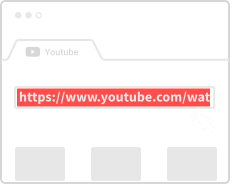
Grab the Link
On Facebook, click the three dots on any video and choose "Copy link" (or just copy from the address bar).
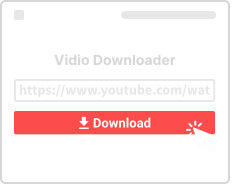
Paste Here
Drop the link in the box above and click Download.
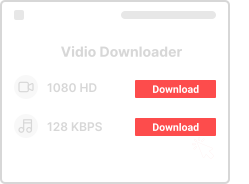
Pick Quality and Save
Choose HD or SD quality, then save the video straight to your phone or computer.
Why Use This Facebook Downloader
Here's what you get:

Completely Free
No charges, no limits. Download as many Facebook videos as you want.

Works on Any Device
Phone, tablet, laptop – if it has a browser, you're good to go.

HD Quality
We keep the original video quality – no compression, no blurriness.

Super Fast
Paste, click, done. The whole thing takes about 10 seconds.

No App Required
You don't need to install anything. It all works in your web browser.

Video or Audio
Grab the video as MP4, or just the audio as MP3 – your choice.
Questions About Facebook Downloads
- Is this safe?
- Yes. We don't store your videos or ask for any personal info. The site runs on HTTPS so your connection is secure.
- Can I pick different quality levels?
- Yes – if the original video is in HD, you can usually choose between SD and HD when downloading.
- Do I need to install anything?
- Nope. It's all browser-based. No apps, no extensions, no plugins.
- Does it work on my phone?
- Yes! Works great on Android and iPhone. Just open this page in your mobile browser, paste the link, and download.
- What about private videos?
- We can only download public videos. If a video is set to private or friends-only, we can't access it.
More Video Downloaders
Need to download from other platforms? Try our specialized tools:
About Facebook Video Downloads
Facebook is one of the largest video-sharing platforms in the world. With billions of videos uploaded by users, businesses, and content creators, there's always something worth saving for later. Our Facebook Video Downloader makes it easy to save any public video directly to your device.
What Types of Facebook Videos Can You Download?
Our tool works with virtually any public Facebook video content. This includes regular video posts from friends and pages, Facebook Watch shows and movies, Facebook Live recordings after they've ended, videos shared in public groups, and video ads that you find interesting. The key requirement is that the video must be publicly accessible – we cannot download videos from private accounts or friends-only posts.
Quality Options
Facebook videos are typically available in SD (Standard Definition) and HD (High Definition) quality. When you paste a link, we'll show you all available quality options for that specific video. HD quality provides sharper images but results in larger file sizes, while SD is more compact and downloads faster. Choose based on how you plan to watch the video – phones work great with SD, while larger screens benefit from HD.
Downloading on Mobile Devices
Our Facebook downloader works directly in your mobile browser – no app installation required. Simply copy the video link from the Facebook app (tap the three dots on any video and select "Copy Link"), then paste it into the download box on this page. The video will be saved directly to your device's gallery or downloads folder.
Legal Considerations
Downloading videos for personal offline viewing is generally acceptable. However, re-uploading someone else's content without permission may violate copyright laws. Always respect content creators' rights and use downloaded videos responsibly.